> For the complete documentation index, see [llms.txt](https://pt-dii.gitbook.io/untitled/llms.txt). Markdown versions of documentation pages are available by appending `.md` to page URLs; this page is available as [Markdown](https://pt-dii.gitbook.io/untitled/menu-my-work/task/attribute-of-task.md).

# Attribute of Task

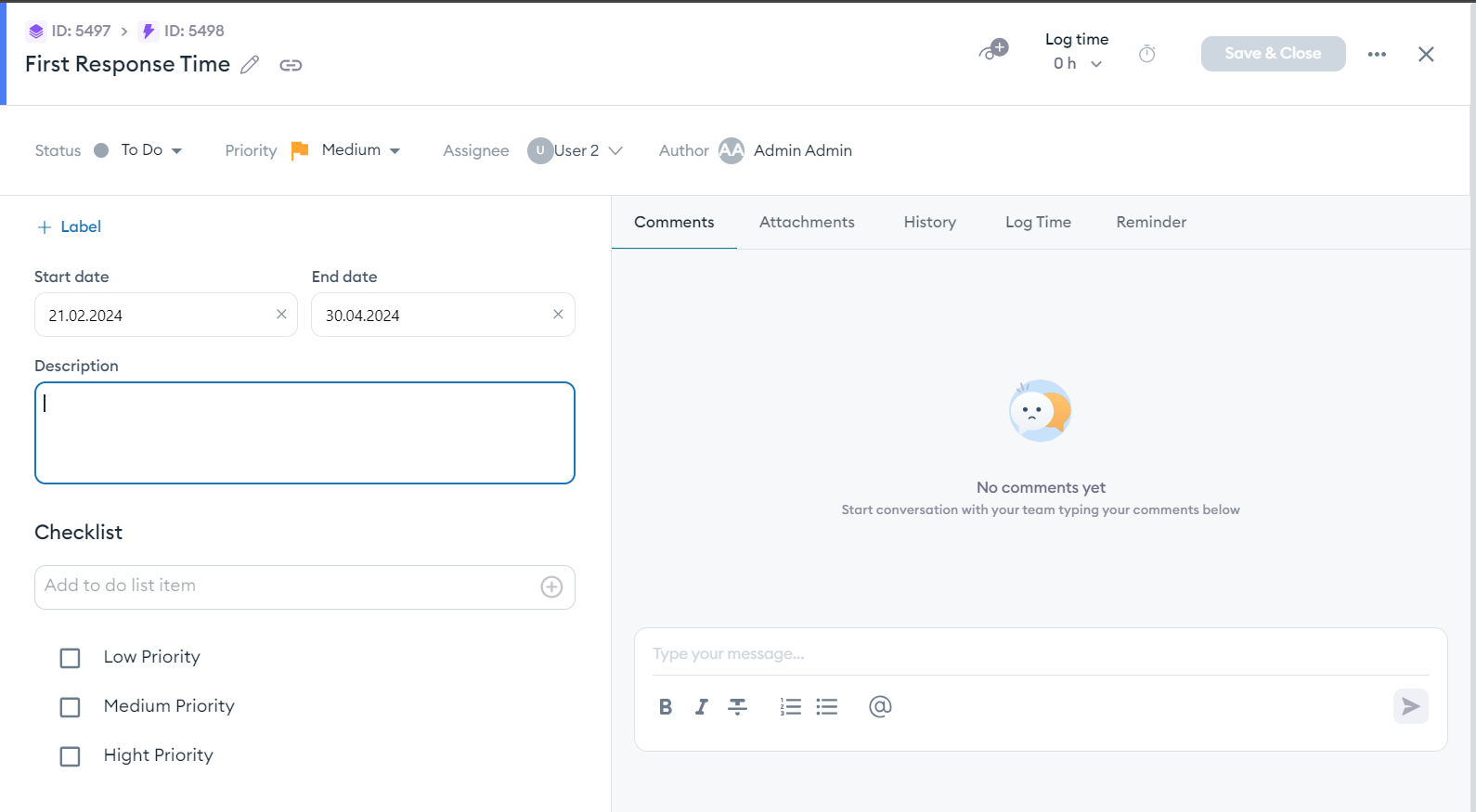
When creating tasks both in Personal Task and in Project and Planning each task has the same attribute. This attribute also applies to Milestone, Epic, and Subtasks.

<figure><img src="https://282948128-files.gitbook.io/~/files/v0/b/gitbook-x-prod.appspot.com/o/spaces%2FHFx8TNpvY30voktrlz4m%2Fuploads%2FRZVki6cxOUW7JkFGEwDG%2Fcreate_task.png?alt=media&amp;token=3fc39a51-6d95-4e0d-ab53-b43a10c0d21d" alt=""><figcaption></figcaption></figure>

<figure><img src="https://282948128-files.gitbook.io/~/files/v0/b/gitbook-x-prod.appspot.com/o/spaces%2FHFx8TNpvY30voktrlz4m%2Fuploads%2Ffrogha9SSPLwRBzyJlyK%2Fcreate_task.png?alt=media&amp;token=f4aa679f-9bd6-4407-99c8-2c2834faf277" alt=""><figcaption></figcaption></figure>

| Section                    | Visual                                                                                                                                                                                                                     | Description                                                                                                                                                                                                                                                                                                                                                                                                                       |
| -------------------------- | -------------------------------------------------------------------------------------------------------------------------------------------------------------------------------------------------------------------------- | --------------------------------------------------------------------------------------------------------------------------------------------------------------------------------------------------------------------------------------------------------------------------------------------------------------------------------------------------------------------------------------------------------------------------------- |
| Task Navigator             | ![](https://282948128-files.gitbook.io/~/files/v0/b/gitbook-x-prod.appspot.com/o/spaces%2FHFx8TNpvY30voktrlz4m%2Fuploads%2FnFvr5FUQWQwM1GVff9nS%2Fcreate_task_1.png?alt=media\&token=9be9698e-ea9d-43c4-80ec-45dab3805417) | Includes function to navigate from Milestone/Epic/Task, Edit the Task Name, and Copy the task link                                                                                                                                                                                                                                                                                                                                |
| Task Progress and Tracking | ![](https://282948128-files.gitbook.io/~/files/v0/b/gitbook-x-prod.appspot.com/o/spaces%2FHFx8TNpvY30voktrlz4m%2Fuploads%2FgKdqeBMFmILtgRJHJYXp%2Flog_time.png?alt=media\&token=fd034c19-ba13-4eee-901c-ba0472306ef6)      | <ul><li>Edit the progress: helps user to define how much "in-progress" is the task</li><li>Recored time is the tools to help user record the time spend working in this task in one day, and record the estimation</li><li>The Eye logo is for user to add watcher of the task, usually relevant for team supervisor to as watcher</li></ul>                                                                                      |
| Status Bar                 | ![](https://282948128-files.gitbook.io/~/files/v0/b/gitbook-x-prod.appspot.com/o/spaces%2FHFx8TNpvY30voktrlz4m%2Fuploads%2FJBG53vizk2gtZkpTGNw4%2Ftask_status.png?alt=media\&token=63f97949-a3bd-4803-a322-8f44a221383f)   | Store information of the task status and priority.                                                                                                                                                                                                                                                                                                                                                                                |
| Task Label                 | ![](https://282948128-files.gitbook.io/~/files/v0/b/gitbook-x-prod.appspot.com/o/spaces%2FHFx8TNpvY30voktrlz4m%2Fuploads%2FIjuh6zrEYohZEkuq5lcK%2Fcustom_label.png?alt=media\&token=26a862a2-1ff9-4d1c-b50e-23c5c9f3bd3b)  | User can add new custom label, or select existing label. This can be use in various case such as label for related division (IT/Finance/HR, etc.), or labeling the defined "In progress" status like In-Progress for recruitment are Shortlist, Interview, Test. The label can accommodate this needs                                                                                                                             |
| Checklist                  | ![](https://282948128-files.gitbook.io/~/files/v0/b/gitbook-x-prod.appspot.com/o/spaces%2FHFx8TNpvY30voktrlz4m%2Fuploads%2FO8TgI6PgiJBylTpPgUx4%2Fchecklist.png?alt=media\&token=5cd76db6-2f88-43ea-92bf-a73fb60dd988)     | Add checklist to the task so you do not missed any point to be done                                                                                                                                                                                                                                                                                                                                                               |
| Task Documentation         | ![](https://282948128-files.gitbook.io/~/files/v0/b/gitbook-x-prod.appspot.com/o/spaces%2FHFx8TNpvY30voktrlz4m%2Fuploads%2FuJNRDj7IQYJZGbBOPDf0%2Ftask_details.png?alt=media\&token=c7446555-00a2-4516-a886-8ad15bf4691f)  | <ul><li>Comment : Commonly used for team member to note task detail progress and update</li><li>Attachment: Attach file, photo, pdf related to the task</li><li>History: Log of any changes to the task, this log cannot be altered or deleted so you can monitor each movement of the task</li><li>Time Log: Records the history of the recored time, which is inputted through Time Record (second row in this table)</li></ul> |